
Homepaw
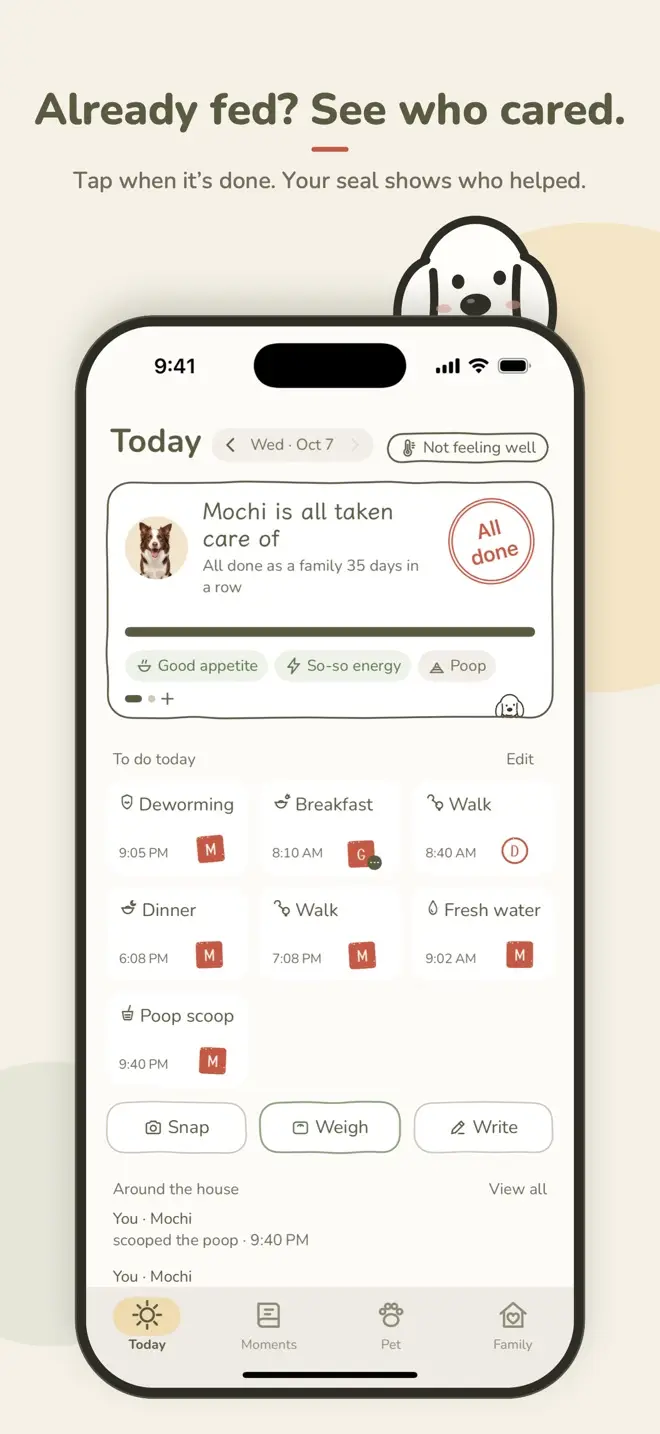
Already fed? See who cared.
Feeding, walks, fresh water, meds: whoever looks after them stamps their own seal. Open your phone and see what’s left today and who was just there for them — no more asking “Did anyone feed the dog?”

Free to download · iPhone and Apple Watch · Now also available on the China mainland App Store
Daily stamps
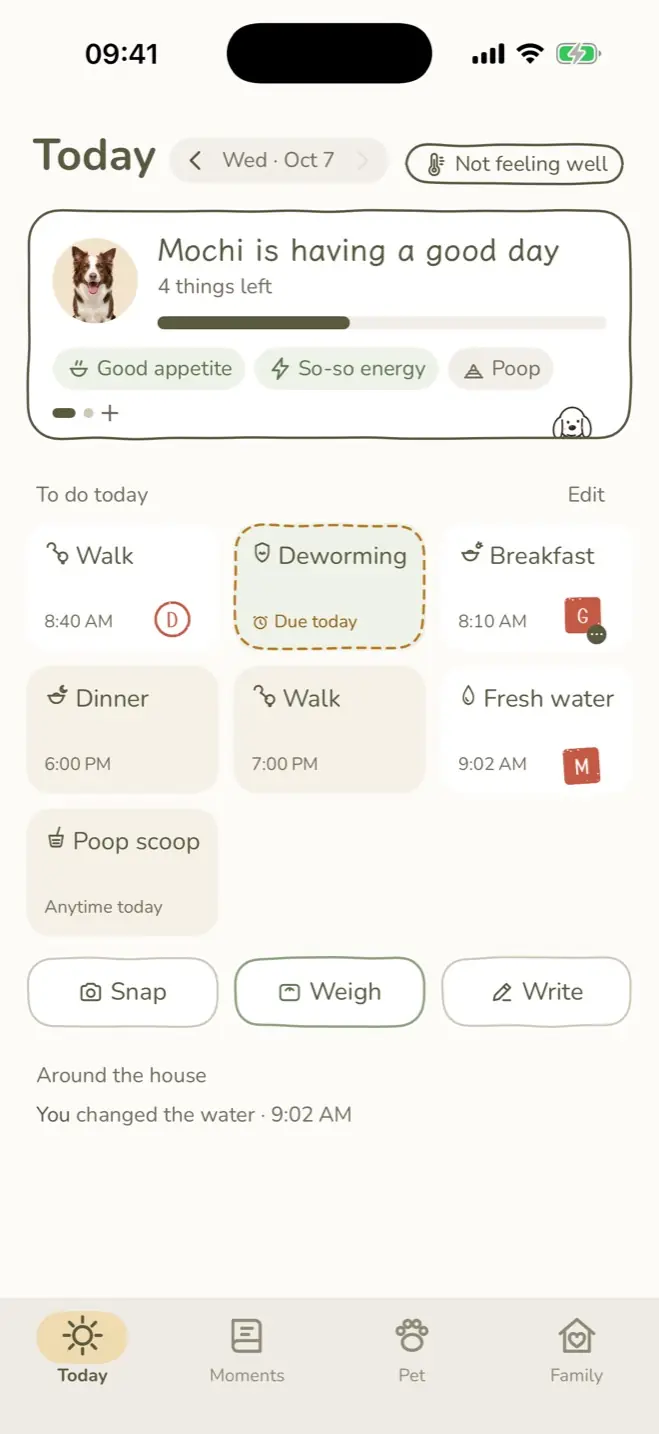
Your pet’s daily routine as small paper cards. Done? Tap to stamp your seal. Finish everything and get the big “All done” stamp.
- Set up for your petDogs get Breakfast, Walk, Dinner and Fresh water; cats get Litter box; bunnies get Top up hay. Vaccines and deworming are spaced by age, more often for pets under a year.
- Add your ownTap “+ Add a task” and choose the time, the days and whether to remind you.
- Already fed? You’ll knowTap something that’s already stamped and you’ll see “Mom already fed them at 8:10 AM”. No more double breakfasts.
- Note it in a tapAppetite, energy and poop in one tap each. Snap, Weigh or Write, and the care becomes a memory.
- Add to a stampAfter stamping, add a photo or a note, or save it as a memory.
- Undo a mistakeTap Undo within 5 seconds, or undo your own stamp later.
- Look backStep through earlier days to see who did what and how your pet was doing.
- More than one petSwipe to switch pets. Dogs, cats and bunnies, or type in any other pet, like a hamster.
A seal for everyone
Pick the letters on your seal, like “M” for Mom or “D” for Dad. Whoever’s seal is on the card is who did it.
- Square filled
- Round outline
- Square outline
- Round filled
- Two-character
- Stamp for familyGrandparent without a phone? The family creator can open Family and tap “+ Add a family member without the app” and give them a seal. When they feed, long-press the card and choose Stamp for family; it notes who stamped for them. Up to 5, and they don’t count toward your family limit.
- See who did itEvery card shows the seal and the name. If someone leaves the family, their seals turn grey and the records stay.
Family sharing
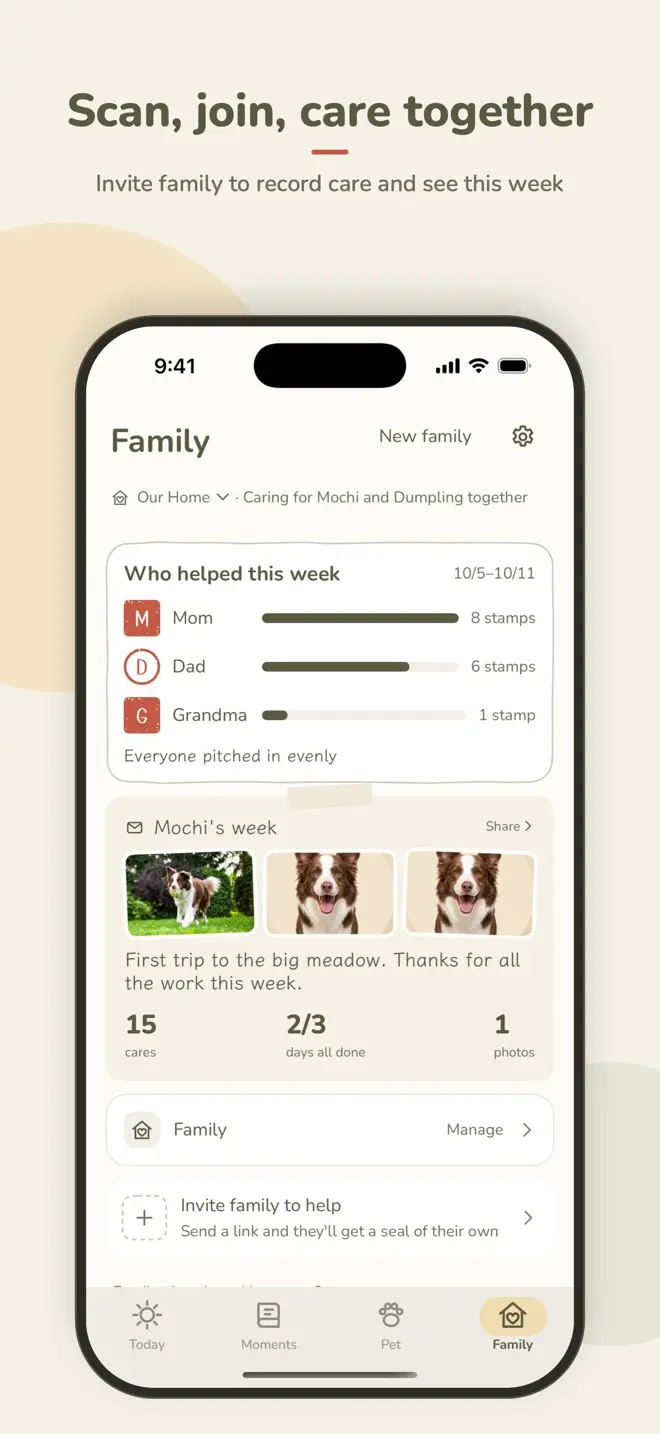
Invite family with iCloud sharing: send a link or scan a QR code. No sign-up needed.
- Link or QR codeInvite Family lets you send an invite, copy the link or show a QR code. Reset the link any time.
- Who helped this weekThe Family page counts each seal this week, so you can see who’s been pitching in.
- Gentle family updatesWhen family stamps, you get one combined notification, at most once an hour. Choose whose activity to show.
- More than one familyHelping with your parents’ dog too? Start a Family and keep them separate.
- Creator and membersThe creator can hand the role to someone else. Members can leave any time, and the creator can close the family.
- Joining is one stepOn the welcome screen, invited family tap I Was Invited · Scan to Join.
Meds & recovery
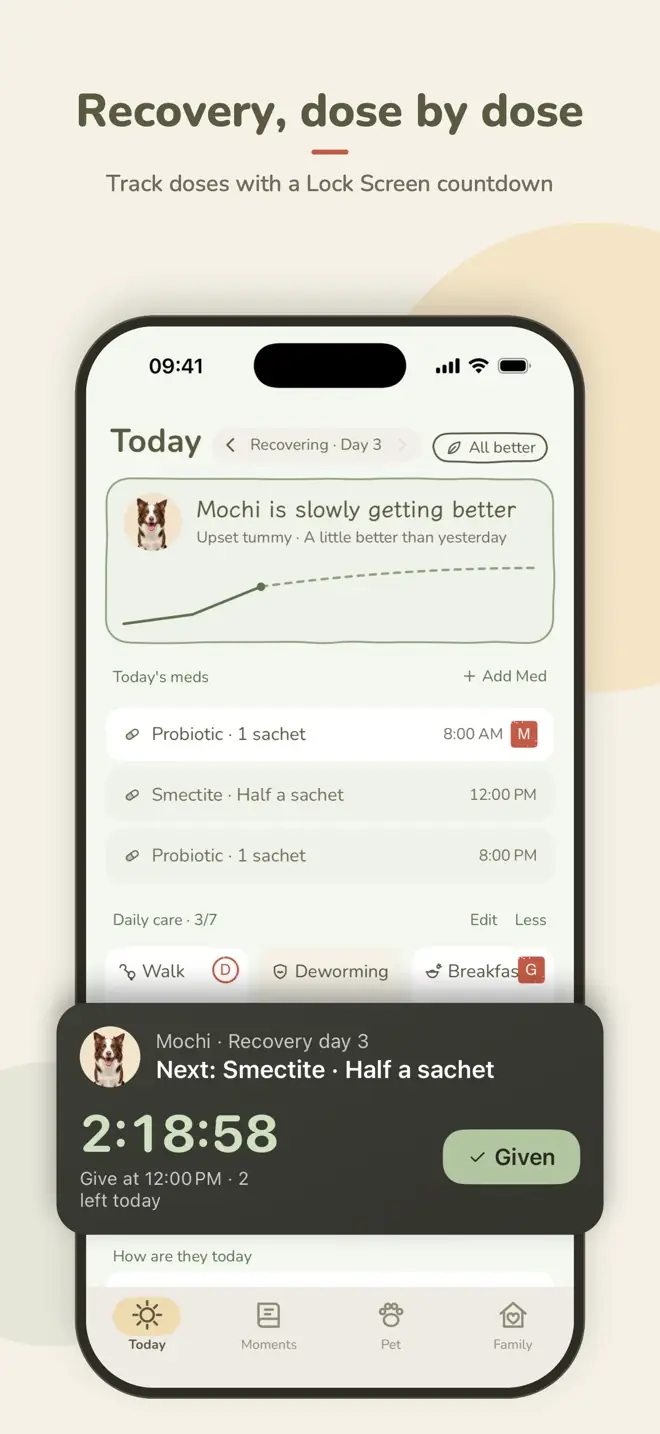
When your pet isn’t well, tap Not feeling well to start recovery mode. Every dose is scheduled, so none get missed.
- Start from what’s wrongVomiting, diarrhea, skin, cough / breathing, after surgery or other, each with its own daily questions.
- Every dose loggedMed, dose and times. Each dose records who gave it and when, with a reminder when it’s due.
- A few daily questionsLike “Vomited today?” or “How’s the poop?”, logged in seconds.
- Recovery curveMemberDaily answers drawn as a curve, so you can see them getting better.
- Lock Screen and Dynamic Island countdownMemberThe next dose counts down on your Lock Screen and in the Dynamic Island. Tap Given right there.
- Long-term meds tooOngoing meds outside recovery show up on Today as well.
- When they’re betterTap They’re better · End recovery and save to Moments, and the episode becomes a recovery chapter.
MochiTime for Mochi’s Breakfast
8:00 AM · No one has done it yet
MochiTime to give Mochi Probiotic, 1 sachet
MochiMochi is due for Deworming today
Reminders
Reminders arrive on time, and you can log it right from the notification without opening the app.
- Care remindersTap I’ll Feed · Stamp to stamp your seal, or Remind Me in 15 Minutes.
- MedsTap Given to log the dose.
- Routine careVaccines and deworming remind you at 9:00 on the day, with a heads-up 3 days before. Set monthly, every six months, yearly or a custom interval, and skip one if it’s long overdue.
- Weekly recapSunday at 8 PM, the week’s recap card arrives.
- Turn off what you don’t needEach of the five kinds can be turned off. Set quiet hours for family updates and the weekly recap.
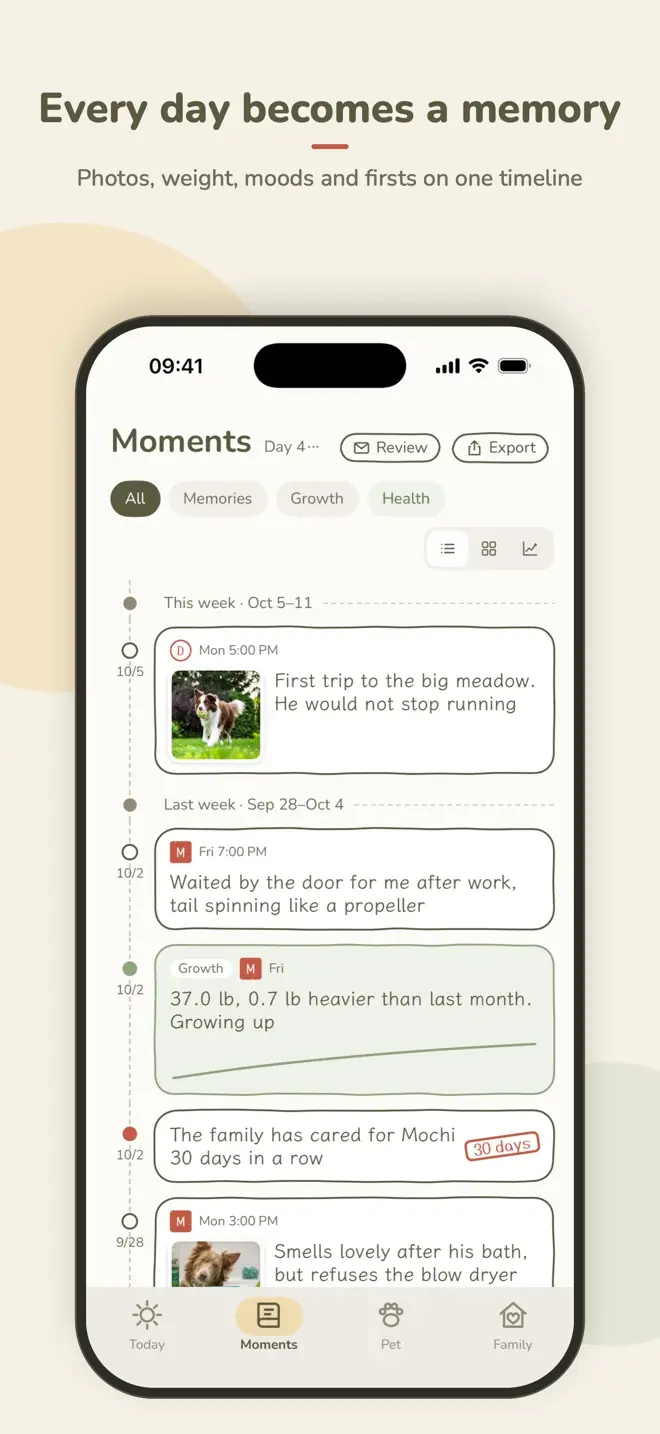
Photos & Moments
Photos, weight, vet visits, recovery chapters and everyday moments, all on one timeline.
- Camera built inSquare viewfinder, front and back cameras, flash and zoom, then crop.
- Avatar cutoutRemove the background from your pet’s photo in one tap, or keep the original.
- Three viewsTimeline, Album and Weight chart; filter by All, Memories, Growth or Health.
- Care streaksAfter 7, 30, 100 and 365 days of family care in a row, Moments gets a milestone stamp.
- Mood calendarView moods on the Pet page. Private care includes this month; unpaid guests see this week. Older history needs your own membership.
- Weight trendsPrivate care includes the last 3 months; unpaid guests see this week. Full trends need your own membership. Kilograms or pounds.
- Bind a journalMemberExport your Moments as a journal PDF you can print.
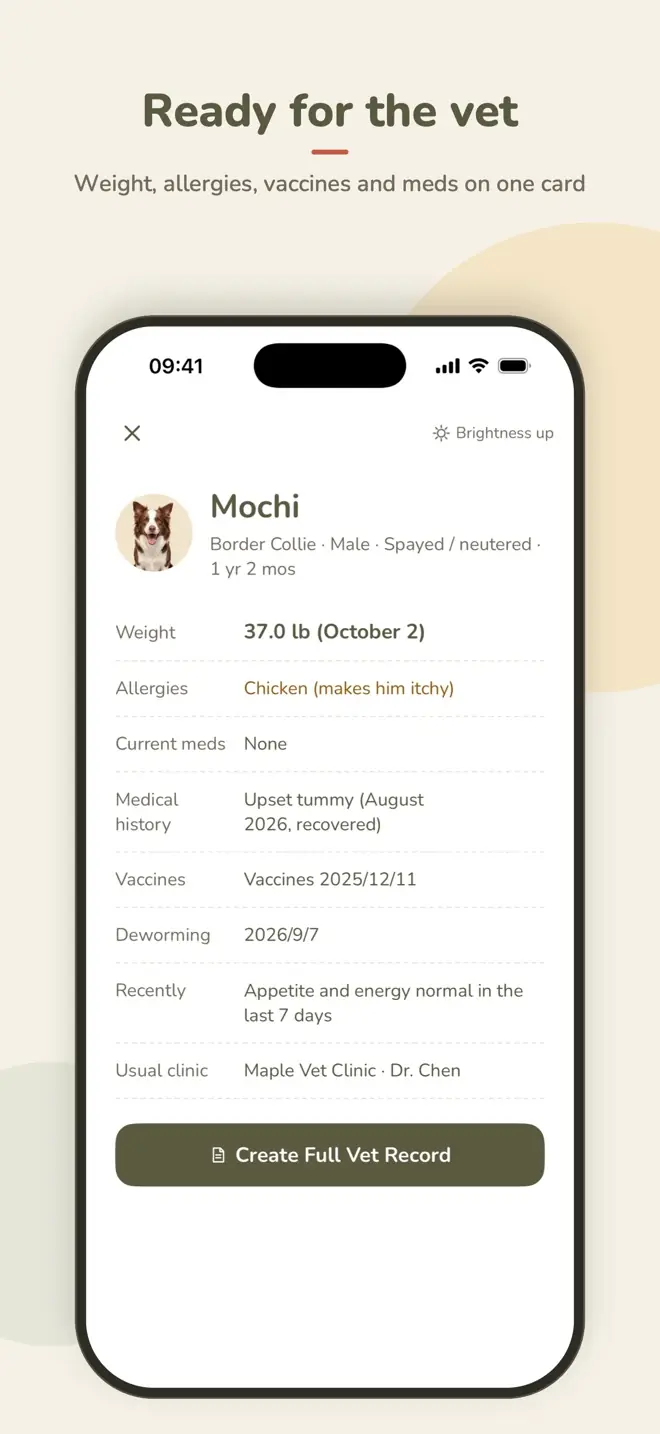
Health card & vet record
At the vet, no more scrolling through chats to find when they were last dewormed.
- One health cardWeight, allergies, vaccines, deworming, current meds and history on one card on the Pet page. Hand it to the vet.
- Log a vet visitWhat the vet said, the cost, and photos of records and receipts, all kept in Moments.
- Vet record PDFMemberCreate Vet Record · For your vet with recent symptoms, meds and weight changes. Also available from a recovery chapter.
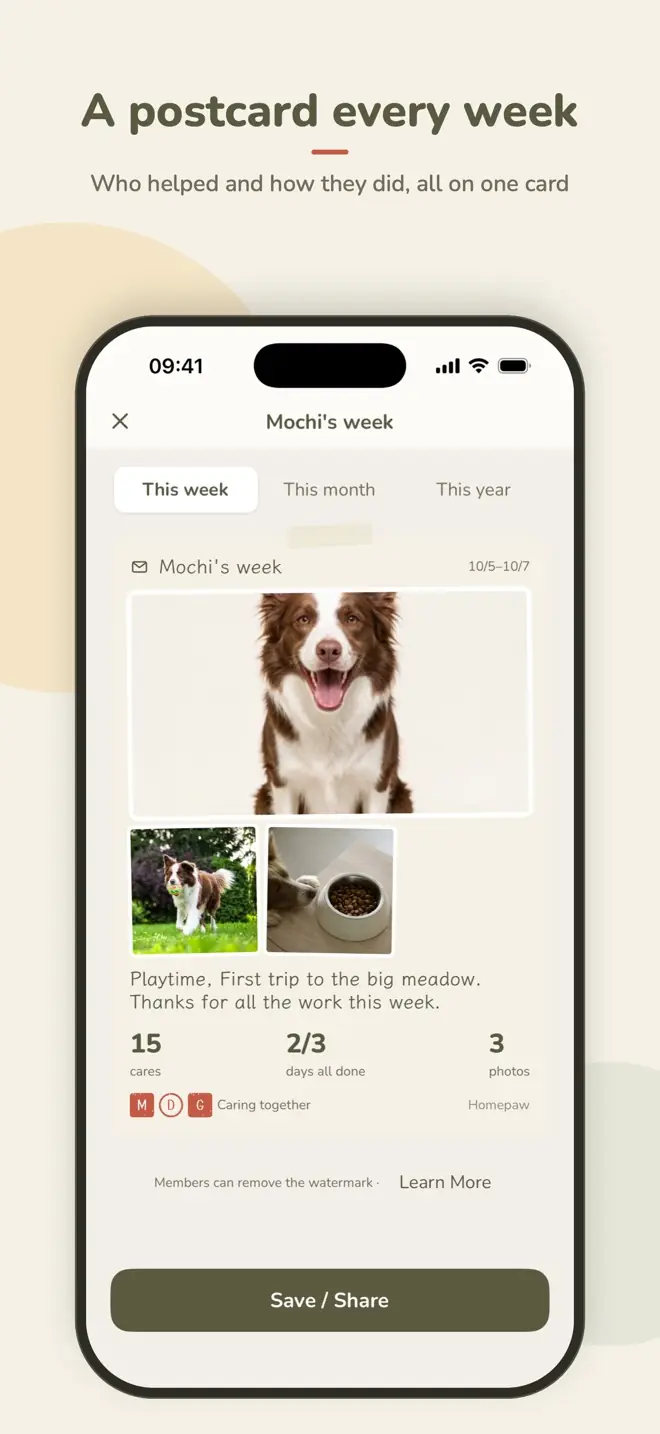
Sharing
The days you spend caring for them are worth sending to family.
- Weekly recap cardWho helped and how their week went, on one card.
- Memory polaroidsTurn any memory into a polaroid-style card.
- Save or sendSave to Photos, send it to family or share it anywhere.
- Monthly and yearly recapsMemberBesides the week, recap this month and this year.
- No watermarkMemberMembers share weekly recaps and memory cards without a watermark; the free plan adds a small one.
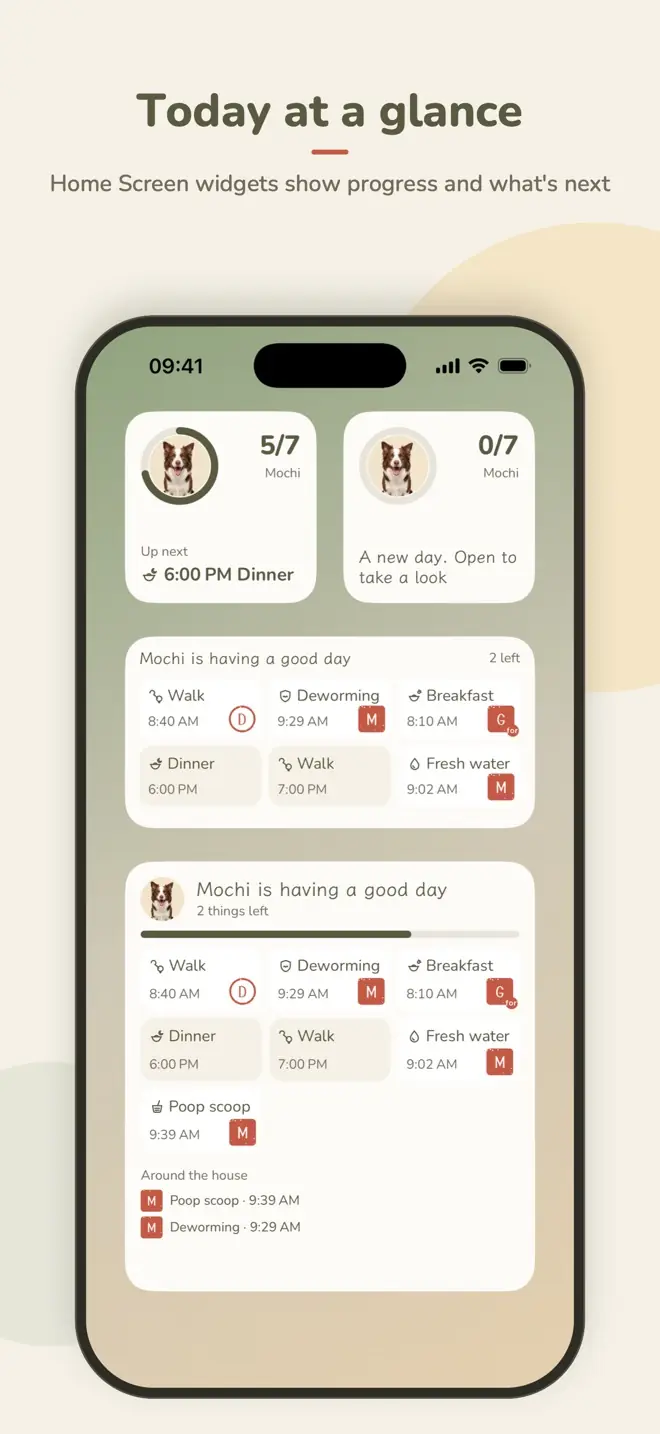
Widgets
See how today’s care is going without opening the app.
- Home Screen widgetsSmall, medium and large, with today’s progress, what’s next and whose seals are on it. Choose which pet to show; tap to open the app.
- Lock Screen widgetsCircular, rectangular and inline, with progress and the next task.
- Dose countdownMemberDuring recovery, the next dose counts down live on the Lock Screen and in the Dynamic Island. Tap Given to log it.
Apple Watch & Siri
Hands full of kibble? Tap your wrist, or just say it.
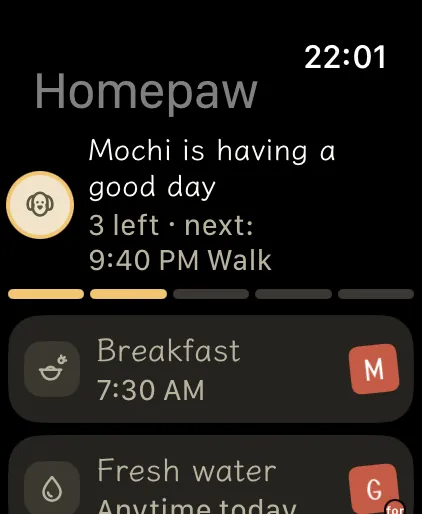
- Stamp on your wristOpen it to today’s tasks and tap a card to stamp your seal.
- Stamp for familyLong-press a card, choose who did it, and stamp for family who don’t use the app.
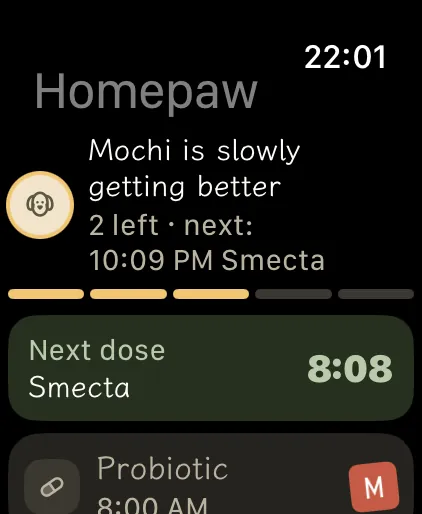
- Meds on your watchDuring recovery, see the next dose and its countdown, and tap to log it.
- Watch face complicationAdd “Today’s care” to your watch face to see how many are left and what’s next.
- Away from your iPhoneStamps wait on the watch and reach the family once your iPhone gets them.
- Ask SiriSay “Stamp with Homepaw” and name the task, or build a one-tap stamp in the Shortcuts app.
Sync & your data
No account, and no servers of ours. Your records live on your phone and in your own iCloud.
- iCloud syncCheck the status any time in Settings › iCloud and Sync. Offline, records are kept on your phone and upload when you’re back online.
- New phone, same recordsSign in to the same iCloud and everything comes back after a new phone or a reinstall.
- Backups on this phoneA daily backup, and you can restore any of the last 7.
- Export all dataA ZIP of JSON and photos, free, any time.
- Recently DeletedDeleted records and closed families can be restored within 30 days.
- Delete My DataLeave every family and delete your data from this phone and your iCloud.
- Dark ModeFollows your system setting.
- English and ChineseFollows your phone’s language.
Free & Membership
Private care for one pet is free. While the creator’s membership is active, guests record care and view this week for free. Older shared history and advanced tools need your own membership. Only the creator invites or adds pets to that family; guests can create their own family.
| Free | Membership | |
|---|---|---|
| Pets | 1 living pet across your unshared private families | Add more pets to families you create |
| Family | Shared care and this week, while creator membership is active | Creator sponsors family care; personal membership unlocks advanced tools |
| Seals | 5 basic styles | Custom shapes, ink, borders and lettering |
| Recovery | Med schedule, dose reminders, daily questions | Plus the recovery curve and the Lock Screen and Dynamic Island countdown |
| Moments | Private basic history; unpaid guests see this week | Full weight and mood history |
| Recap cards | Weekly (with a watermark) | No watermark, plus monthly and yearly recaps |
| Export all data (ZIP) | Journal PDF and vet record PDF |
- Monthly
- Yearly · 7-day free trial
- Lifetime · one-time purchase
Prices are shown in the App Store. Subscriptions renew automatically; cancel any time in Settings › your Apple Account › Subscriptions. If the creator’s membership expires, shared recording pauses until the creator renews. Your own expiry only locks your advanced tools. Data is retained; existing families keep their benefits.
FAQ
Does everyone need the app?
No. Add a grandparent as a family member without the app and stamp for them. Family who want to log too install the app and join with your link or QR code.
Do I need an account?
No. Homepaw syncs and shares through your iCloud. Without iCloud you can still log on this phone; you just can’t invite family.
What happens when I leave a household?
Once an invited family exit completes, its local shared copy is removed. Your contributions stay with the family and other members are unaffected. Keep families you created while creating or scanning an invitation to join another. Leaving requires a network connection. Deleting the app does not delete iCloud records or cancel a subscription. See Support and FAQ.
Can you see my records?
No. We have no servers, collect no data, don’t track you and show no ads. Records stay in your and your family’s iCloud. See the Privacy Policy.
What do I need?
An iPhone with iOS 18 or later. Apple Watch needs watchOS 11 or later, and the watch app installs automatically once it’s on your iPhone.
What if one day they’re gone?
On the Pet page you can mark that they’ve crossed the rainbow bridge. Their Moments and records are kept, and widgets and Apple Watch switch to a quiet memorial look.
More answers on Support & FAQ, or write to beyondbyterminal@gmail.com.
Many hands. One happy paw.
Information in the app is for reference only and isn’t veterinary advice. If your pet is unwell, please see a vet.